
App at a Glance
The facts below cover the JeetWin Android app and the iPhone home-screen version. Both open the same platform with the same wallet.
- Android
- APK file from the Download App page
- iPhone and iPad
- Mobile site added to the home screen
- From a computer
- QR code on the Download App page
- Games
- 1,000+ including sports betting
- Account
- Same username and password as on the website
- Currency
- Indian rupee (₹)
- Support
- Live chat 24/7 inside the app
- Age
- 18+ only
One account covers sports, exchange, casino and live games, so you never need a second login for the app.
JeetWin APK Download for Android in 6 Steps
The Android app is an APK file that you download from the site and install yourself. The process takes six short steps and one permission in Settings.
 Open the site on your phone. Use Chrome or another mobile browser on your Android phone. On a computer, open the Download App page and scan the QR code with your phone camera.
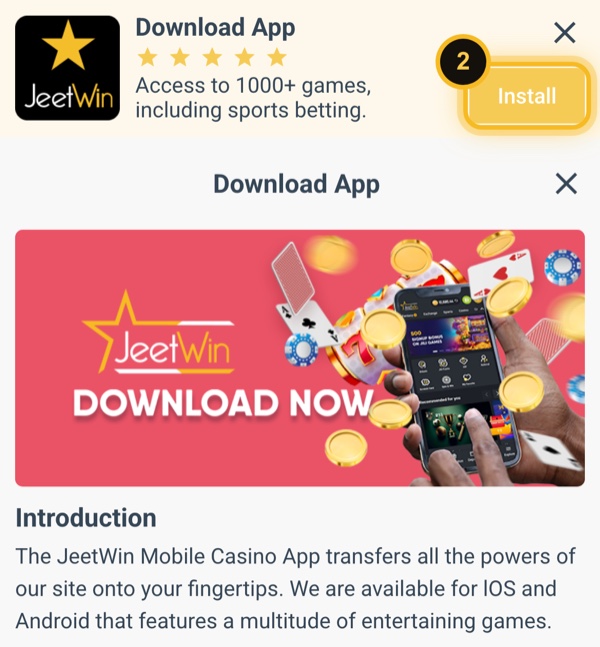 Tap Download App. On the mobile site, tap Install on the “Download App” banner, or open the Download App page.
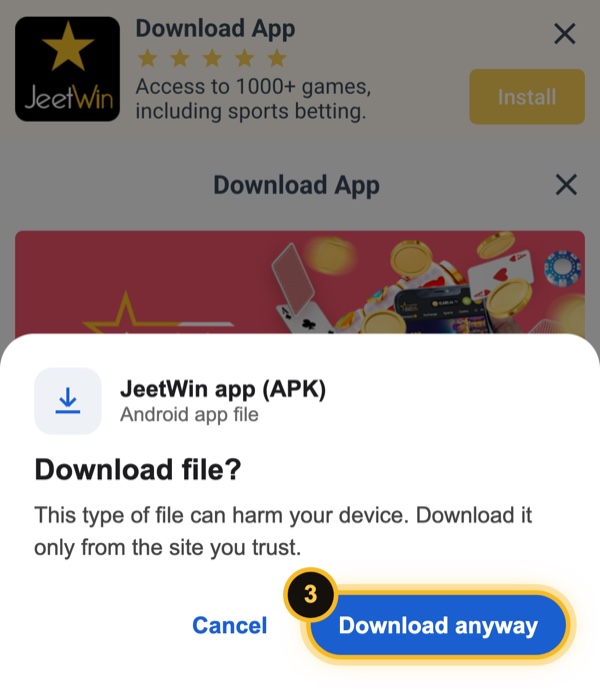 Download the APK file. Confirm the download when the browser asks. Android may warn that this type of file can harm your device; this message appears for any APK.
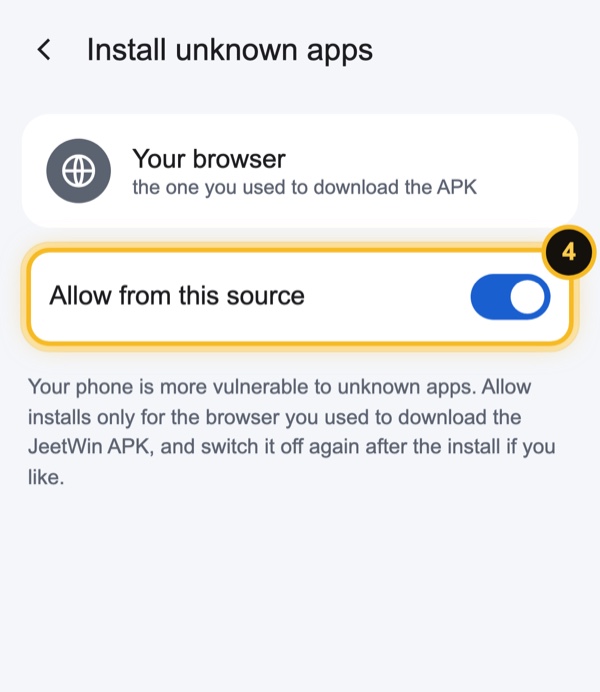 Allow installs from your browser. Open Settings, find the option to install unknown apps and switch it on for the browser you used. The name of the setting differs between phone brands.
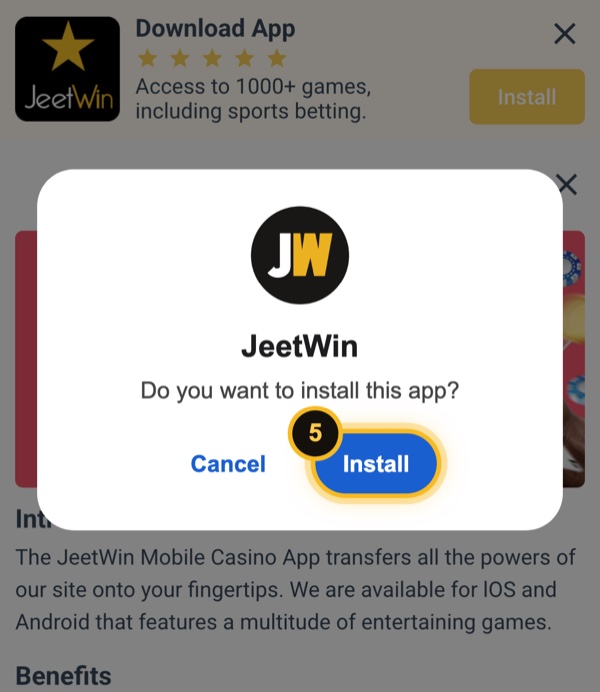 Install the app. Open the downloaded file from the notification bar or the Downloads folder and tap Install.
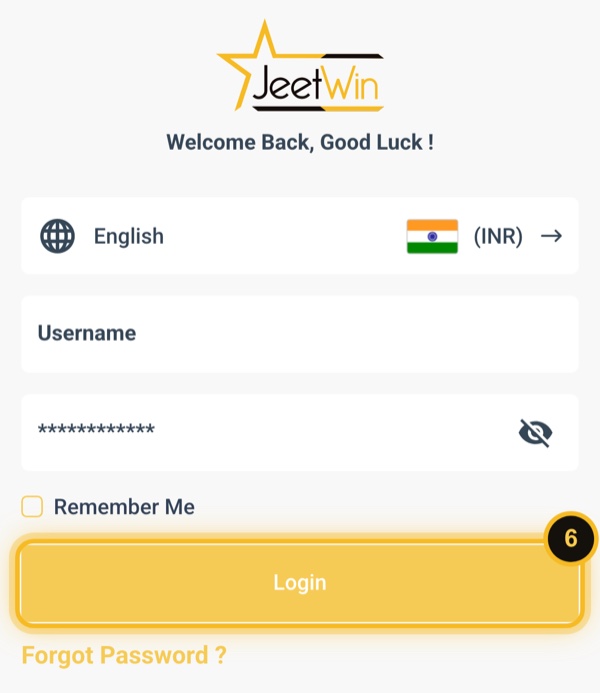 Log in. Open the new icon and log in with your username and password, or tap Sign Up if you are new.
- After the install, you can switch the browser permission off again: the app keeps working;
- You can delete the APK file from Downloads once the app is installed;
- If Android says the app was not installed, free some storage and download the file again over stable Wi-Fi.
Keep the APK file only until the app opens: an old file in Downloads is easy to confuse with a newer one later.
Get the Android App APK file from the Download App page
Download AppHow to Add the Mobile Site to Your iPhone Home Screen
On iPhone and iPad, you use the mobile site in Safari and save it to the home screen. The icon then opens the site in one tap, like an app.
 Open Safari. Go to the JeetWin mobile site on your iPhone or iPad.
 Tap Share. Tap the Share icon, a square with an arrow, in the Safari toolbar. If the icon is not on the toolbar, tap ••• next to the address bar, then Share.
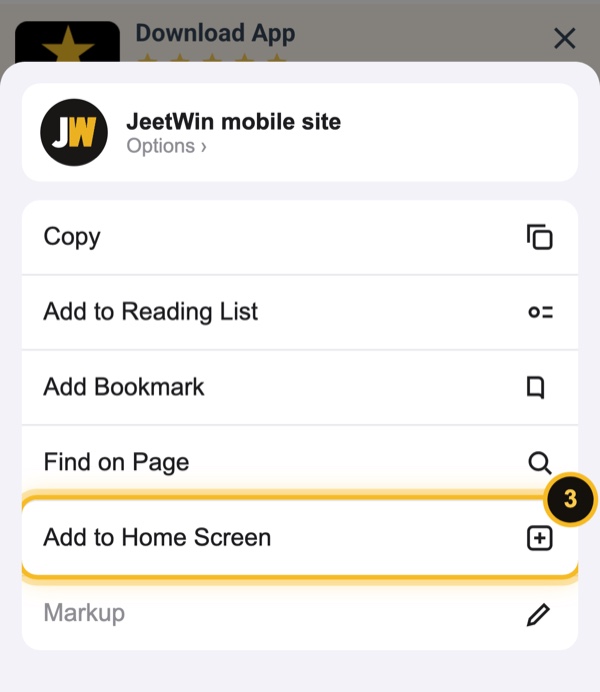 Choose Add to Home Screen. Scroll the share menu and tap Add to Home Screen.
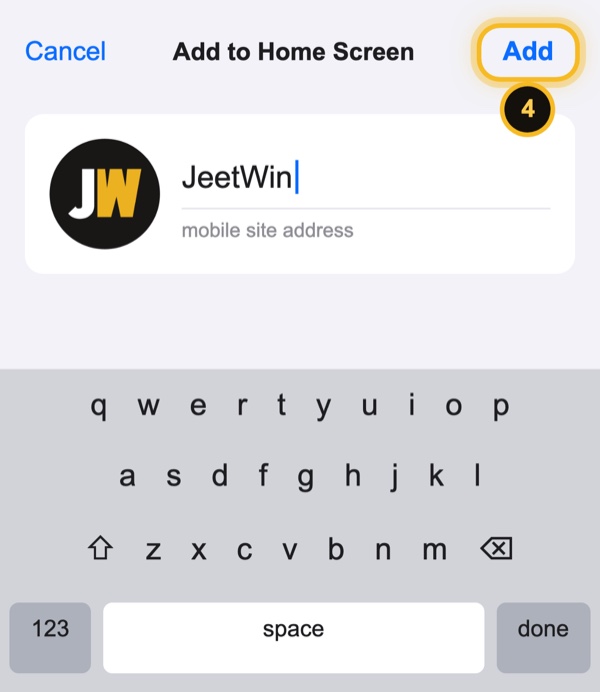 Confirm the name. Keep or edit the icon name and tap Add.
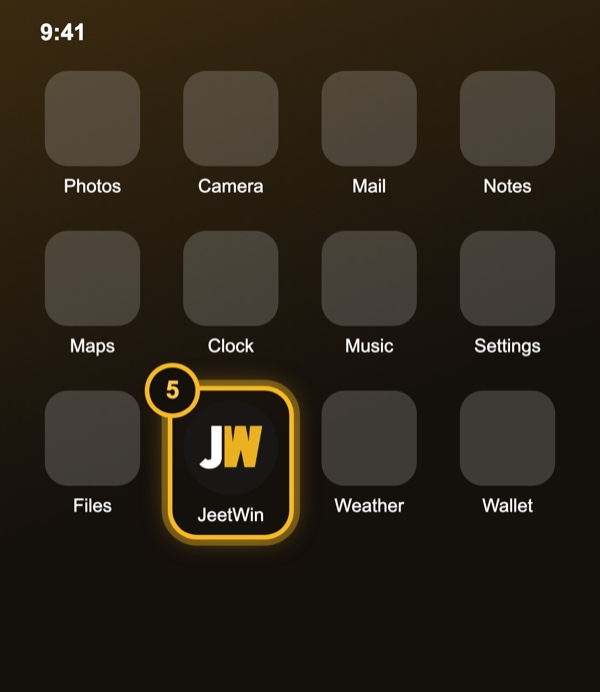 Open the icon and log in. Tap the new icon on your home screen and log in with your username and password.
Tick Remember Me only on your own iPhone; on a shared device, log out after each session.
Android App vs Mobile Site
Both options run the same account, balance and games. The difference is in how you open them and how they update.
| Feature | Android app (APK) | Mobile site |
|---|---|---|
| Devices | Android phones | iPhone, iPad, Android and other phones with a browser |
| How you get it | Download App page or QR code | Open the site in a mobile browser |
| Install | APK file, one browser permission | Nothing to install; optional home-screen icon |
| Account | Same username and password | Same username and password |
| Sections | Sports, exchange, casino, promotions, VIP | Sports, exchange, casino, promotions, VIP |
| Payments | Deposit and withdraw in INR | Deposit and withdraw in INR |
| Live chat | 24/7 | 24/7 |
| Updates | Install the latest APK the same way | Nothing to update |
If your Android phone is short on storage, the mobile site gives you the same account without an install.
What You Can Do in the JeetWin App
The app gives you the sections of the main menu: Exchange, Sports, Casino, Aviator, Instant Game, Slots, Fishing, Table, Lottery and Cock Fight, plus Promotion and VIP. On mobile, the bottom menu holds Home, Promotion, Deposit, Support and Menu.
Sports Betting
Bet on cricket, football, tennis, hockey and more across BTI, SABA, SBO, Pinnacle, CMD and LuckySports. For cricket betting, tap the odds, enter a stake in the bet slip and tap Place Bet.
Exchange
The 9Wickets exchange lets you back or lay an outcome. Members bet against each other and set the odds themselves.
Casino
Slots, fishing, table, lottery and instant games, plus Aviator and other crash titles. The live casino tables come from Evolution, Ezugi, Pragmatic Play and other studios.
Deposits
Tap Deposit in the bottom menu and pay by UPI, IMPS, Paytm, AstroPay or USDT into your INR balance. The deposit and withdrawal steps match the website.
Withdrawals
Add your bank on the Withdraw page once, then request from ₹2,000 to ₹99,000 per online request. The money goes to the bank account linked to your profile.
Promotions
Open Promotion, choose an offer, tap Join Now and enter the amount. New players can pick welcome bonuses such as 200% up to ₹10,000 on slots and fishing games.
Live Chat
Tap Support for live chat 24/7. Telegram @jwinrtgsupport and e-mail support@jeetwin.com work from the app too.
Everything sits in one account, so a deposit made in the app is ready to use on the website.
Log In or Sign Up in the App
The JeetWin app uses the same account as the website. If you already play on a computer, log in with the same details; if not, create an account from the app.
Log In
- Open the app and tap Login;
- Enter your username and password;
- Tick Remember Me on your own phone;
- Tap Login to open your account.
Sign Up
- Tap Sign Up;
- Choose a username and password;
- Enter your mobile number with +91;
- Fill in “Got Promo Code?” only if you have a code;
- Tick the box to accept the Terms & Conditions and Privacy Policy, then tap Join Now.
- Members who complete registration receive 5 free spins and a chance to win prizes;
- If a password does not work, the steps to log in and reset it with Forgot Password? are the same as on the website.
Three failed attempts lock the account until member support unlocks it, so reset the password early if you are unsure.
New to the Platform? Sign up with a +91 mobile number and get 5 free spins
Join NowHow to Update the App
A new version of the JeetWin Android app comes as a fresh APK file. You update it the same way you installed it.
- Open the Download App page. On your phone, tap Install on the mobile site banner, or scan the QR code from a computer.
- Download the latest APK. Confirm the download in your browser.
- Install over the old app. Open the file and tap Install or Update.
- Log in again if asked. Your account and balance do not depend on the app file, so nothing is lost.
- If the update will not install, uninstall the old app first and then install the new file;
- The iPhone home-screen icon needs no update: it always opens the current mobile site.
Update only from the Download App page, never from a link sent in a chat or a text message.
Safety Tips for the APK
An APK file can come from anywhere, so where you get it matters. These rules keep your account and phone safe.
- Download the APK only from the JeetWin site: the Download App page, its QR code or the Install banner;
- Skip third-party APK portals and file-sharing links: they may host old or modified files;
- Turn off the browser permission to install unknown apps once the app is installed;
- Never share your password with anyone;
- Tick Remember Me only on your own phone;
- Changes to your account details go through member support with identity verification;
- The app is for players aged 18 and over.
If you installed the app from somewhere else, uninstall it and download the APK again from the Download App page.
How to Uninstall the App
Removing the JeetWin app from your phone does not close your account or touch your balance. You can install it again at any time.
Android
- Touch and hold the app icon, or open Settings, then Apps, and choose the app;
- Tap Uninstall;
- Confirm to remove the app.
iPhone and iPad
- Touch and hold the home-screen icon;
- Tap the option to remove it;
- Confirm to delete the icon.
To take a break from play rather than from the app, ask member support about Time-Out, self-exclusion or account closure, which are part of responsible gaming tools.
JeetWin App FAQ
Is there an app for iPhone?
On iPhone and iPad, you use the mobile site in Safari and add it to the home screen with Share and Add to Home Screen. The icon opens your account in one tap.
Where do I download the APK?
Use the Download App page: tap Install on the banner of the mobile site, or scan the QR code from a computer. Do not use third-party APK portals.
Why does my phone block the install?
Android blocks apps from unknown sources by default. Allow installs for your browser in Settings, then open the APK file again.
Can I use one account in the app and on the website?
Yes. One account works for sports, exchange, casino and live games on the website, the mobile site and the app.
How do I update the JeetWin app?
Download the latest APK from the Download App page and install it over the old app. If it fails, uninstall the old version first.
Can I deposit and withdraw in the app?
Yes. Tap Deposit in the bottom menu to pay in rupees, and use the Withdraw page to send money to the bank account linked to your profile.