
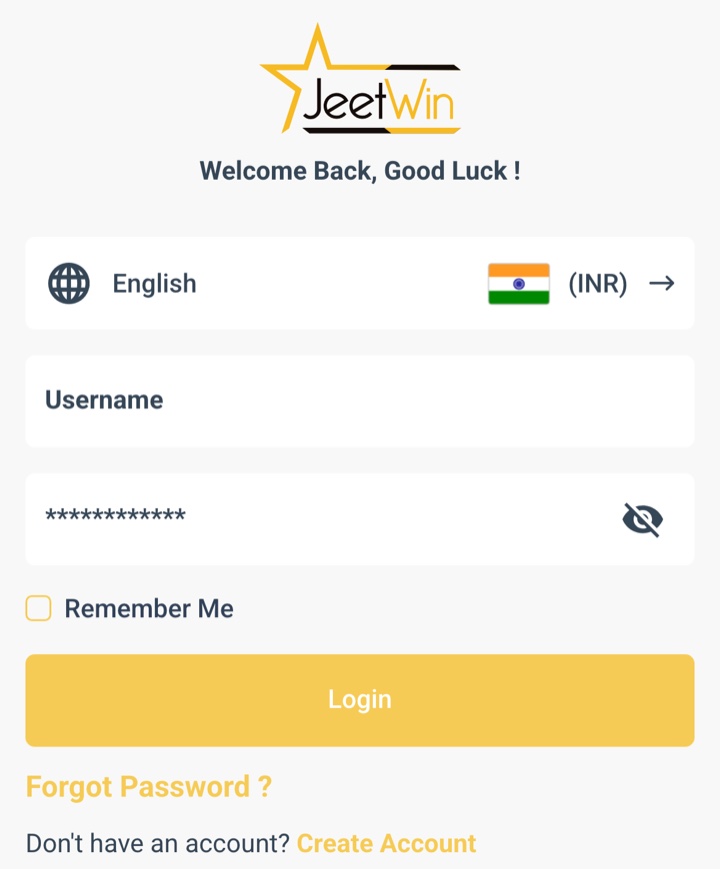
How to Log In on Desktop
On a computer, the login form sits in the site header, so you can sign in from any page. Use the details you chose at registration.
- Open the website. Press Login on this page to go to the platform.
- Enter your username. Type it in the Username field exactly as you created it.
- Enter your password. Use the Password field next to it and check that Caps Lock is off.
- Tick Remember Me on your own computer. Leave it empty on shared or office computers.
- Press Login. You are signed in to sports, the exchange, casino and live games at once.
| Header element | What it does |
|---|---|
| Username | Your login name from sign-up |
| Password | Your private password |
| Remember Me | Keeps your login on this device |
| Forgot Password? | Starts the password reset by e-mail |
| Login | Signs you in |
| Sign Up | Opens the registration form for new players |
The header also holds the country flag and the dark-mode toggle, so you can switch the theme before or after you log in.
Log In on Mobile
The mobile site works in any phone browser, with no install. The login form opens from the Login button.
- Open the mobile site. Use Chrome, Safari or another mobile browser.
- Tap Login. The form with the Username and Password fields opens.
- Enter your details. Type your username and password; tick Remember Me only on your own phone.
- Tap Login again. Your account opens with the bottom menu: Home, Promotion, Deposit, Support and Menu.
- Deposit opens the cashier for deposit and withdrawal in INR;
- Promotion lists the offers you can join;
- Support puts you in touch with member support;
- Menu holds all game sections, Promotion and VIP.
On iPhone, add the mobile site to the home screen to open it in one tap.
Sign In to Your Account Username and password: the same on desktop, mobile and app
LoginApp Login on Android and iPhone
The Android app uses the same username and password as the website. You do not need a separate app account.
Android App
- Install the APK from the Download App page;
- Open the app and tap Login;
- Enter your username and password;
- Tick Remember Me on your own phone.
iPhone and iPad
- Open the mobile site in Safari;
- Tap Share, then Add to Home Screen;
- Open the new icon and tap Login;
- Enter your username and password.
Your balance, bets and bonuses are the same in the app and on the website, because it is one account.
JeetWin Pro, JeetWin Club and 188 Login
Players search for Pro login, Club login or 188 login, but these names point to the same platform and the same account. You need one username and one password.
| Name you search | Login details | Account |
|---|---|---|
| JeetWin Pro login | Username and password | Same account |
| JeetWin Club login | Username and password | Same account |
| JeetWin 188 login | Username and password | Same account |
| App login | Username and password | Same account |
- No second registration is needed for another name of the platform;
- Your balance, VIP level and JW Points stay the same;
- Forgot Password? and the three-attempt lock work the same way under every name.
If a login page asks for anything besides your username and password, such as a card number, close it and use the Login button on this page.
Reset Your Login Password
A forgotten password is reset from the login form. You need your username and the e-mail address linked to your account.
- Press Forgot Password? On desktop, it sits in the header next to the login fields.
- Enter your username. Type it exactly as you created it at sign-up.
- Enter your e-mail. Use the address linked to your account.
- Check your inbox. A new password arrives by e-mail; look in the spam folder if you do not see it.
- Log in with the new password. Store it in a password manager or another safe place.
Use Forgot Password? after the second failed attempt: the third one locks the account.
Recover a Forgotten Username
The password reset needs your username, so a forgotten username goes through support by e-mail.
- Write to support@jeetwin.com from the e-mail address registered on your account;
- Ask support for your username in the message;
- Wait for the reply with your username, then log in as usual.
Always write from the registered address, not from a new one.
Account Locked After Three Failed Attempts
After three failed login attempts, the account is locked to protect it. Only customer support can unlock it, through any of these channels.
| Channel | Contact | When to use |
|---|---|---|
| Live chat | Website and app | Any time, 24/7 |
| Telegram | @jwinrtgsupport | From your phone |
| support@jeetwin.com | From your registered address |
- Give support your username;
- Confirm your identity if support asks;
- Reset the password with Forgot Password? if you are not sure of it.
Stop after two failed tries and reset the password instead of risking the lock.
Login Problems and Fixes
Most login problems have a quick fix. Find your case in the table.
| Problem | Fix |
|---|---|
| Wrong username or password | Check Caps Lock and the spelling of the username; use Forgot Password? before the third try |
| Account locked | Contact member support in live chat, on Telegram or by e-mail |
| No e-mail with the new password | Check the spam folder and make sure you entered the e-mail linked to your account |
| Forgotten username | Write to support@jeetwin.com from your registered e-mail |
| Login form does not load | Refresh the page, clear the browser cache or try another browser |
| App does not accept the details | Use the same username and password as on the website; reinstall the APK from the Download App page |
| Signed in on a shared device | Log out and untick Remember Me |
| Forgot both username and password | Get the username from support@jeetwin.com first, then use Forgot Password? |
| Logged out on your own phone | Log in again and tick Remember Me |
| Self-exclusion is active | You can still log in and withdraw your balance during the period |
| Travelling abroad | Play is not available from restricted countries such as the United Kingdom, the USA, Spain or Singapore |
If none of the fixes helps, send support your username and a short description of the error.
Keep Your Account Secure
Your username and password are the only keys to your balance. A few habits keep them safe.
- Use a password you do not use on other sites;
- Tick Remember Me only on your own phone or computer;
- Log out after playing on a shared device;
- Never send your password in chats, e-mails or social media messages;
- Install the app only from the Download App page;
- Keep your registered e-mail active: the password reset and username recovery depend on it;
- Change account details only through member support, which verifies your identity first.
If you need a break, self-exclusion from the responsible gaming tools still lets you log in and withdraw your balance.
What to Do After You Log In
Once you are signed in, the main account tasks start from the menu, the cashier or member support. The table shows where to find the most common ones.
| Task | Where to go |
|---|---|
| Top up your balance | Deposit, then choose UPI, IMPS, Paytm or another method |
| Withdraw winnings | Withdraw: Add Bank first, then fill in the withdrawal form |
| Join a bonus | Promotion, open the offer and tap Join Now |
| Redeem JW Points | Deposit tab, then Points, choose the amount and press Redeem (Silver level and above, from ₹50) |
| Check a pending bet | Give the bet ID to support in live chat |
| Set a deposit limit | E-mail support from your registered address |
Log out when you finish on any device you share with others.
Back to Your Bets Sports, exchange and casino with one login
LoginJeetWin Login FAQ
Is JeetWin Pro login the same as JeetWin login?
Yes. Pro, Club and 188 are names players use for the same platform, so one username and password work for all of them.
Can I log in with my mobile number?
The login form asks for your username and password. If you forgot the username, write to support@jeetwin.com from your registered e-mail.
What happens after three wrong passwords?
The account locks after three failed attempts. Member support unlocks it through live chat, Telegram or e-mail.
Do I need a separate login for the app?
No. The Android app and the mobile site use the same username and password as the website, and your balance is shared across all three.
How do I change my registered e-mail or mobile number?
Contact member support in live chat or by e-mail. Changes to account details need identity verification, so keep your photo ID at hand.
Can I log in during self-exclusion?
Yes. During self-exclusion you can log in and withdraw your balance, and new accounts opened in that period are detected and closed.